

How to build a small business budget for the new year


Build a small business budget from last year’s results: add the decisions that will change those numbers, map revenue and expenses into the months they actually happen, then convert the plan into a cash view and test it against a downside case.
A revenue target tells you where you want the business to end up. It doesn't tell you when the sales need to happen, what they'll cost, or whether you'll have the cash to cover a large expense along the way.
A budget doesn’t need to predict every number correctly. It needs to change what you do when one of them is wrong.
This guide builds a 12-month budget for a consulting business turning over $180,000 — and shows how the same plan that posts a profit every month can still run short of cash in May.
What is a small business budget?
A small business budget is a plan for the revenue you expect to earn, the expenses you expect to pay and the resulting profit or loss over a set period. Breaking an annual business budget into months helps you see when sales, costs and financial pressure points occur.
A budget serves a different purpose from bookkeeping and financial statements. Bookkeeping records what has already happened. Financial statements summarize those results. Your budget uses that history, along with your plans for the year ahead, to map what happens next.
A budget also differs from a cash-flow forecast. Your budget focuses on planned revenue and expenses. A cash-flow forecast focuses on when money is expected to enter and leave your bank account.
Take a consulting business budgeting $180,000 for the year: 120 projects at $1,500, delivered by one person with a contractor covering the overflow. Spread evenly, that’s $15,000 a month and nothing to decide. Mapped to the months the work actually lands, it’s $18,000 in March and $10,500 in July — and the second version is the one that tells you.
Why does budget planning matter for a small business?
Budget planning shows how business decisions affect your numbers before you commit to them.
Monthly projections show whether next year’s decisions fit. Put each one in the month it lands:
- a price increase
- a new hire or contractor
- a marketing campaign
- an equipment purchase
- owner pay
- tax instalments
- loan payments
A healthy bank balance today doesn’t show whether next month’s bills, tax payments or planned investments are covered. The balance that made a January hire look affordable was three invoices landing in the same week. Comparing results with your monthly budget shows where the plan and actual performance differ.
The planning process also exposes assumptions and trade-offs. Putting numbers against a new hire, campaign or purchase shows what has to happen for the decision to work and what needs to change if results fall short.
The Business Development Bank of Canada recommends building monthly projections across three scenarios — most likely, optimistic and pessimistic — so you know in advance which months need a decision.
What should you include in a business budget?
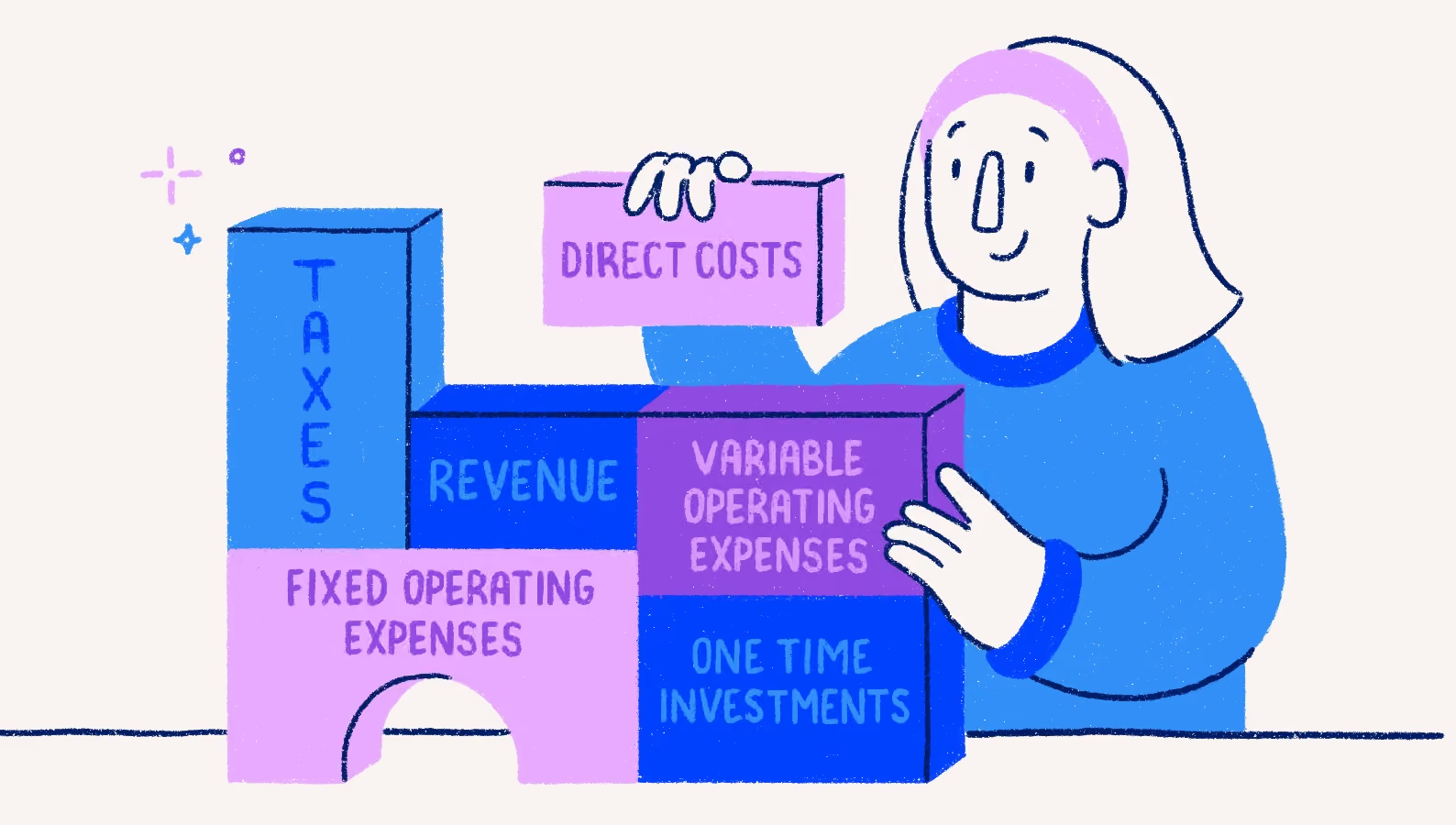
A business budget covers six things: revenue, direct costs, operating expenses, one-time spending, cash commitments, and contingency. Keep them separate — it’s the only way to see what drives profit separately from what drives cash.
Revenue
Break revenue into major products, services or customer groups. Build your revenue forecast from expected customers, projects, units, prices and timing.
Cost of goods sold or direct costs
Include costs tied directly to sales, such as materials, shipping, transaction fees and subcontractors. Subtract these costs from revenue to calculate gross profit.
Fixed operating expenses
List costs that stay relatively stable, such as rent, software, insurance and salaries. Start with recurring commitments you already know.
Variable operating expenses
Include costs that change with activity or season, such as marketing, travel and utilities. Tie each expense to the activity that drives it.
One-time investments
Separate equipment, renovations, launches and other non-recurring spending from normal operating costs.
Taxes, debt payments and owner withdrawals
Track these separately because they reduce available cash even when they don’t appear as operating expenses on the income statement.
Contingency
Add a clearly labelled contingency for uncertainty. Base the amount on your business risks and upcoming commitments, not a universal percentage. As a starting point, consider keeping 20% to 30% of your average monthly operating expenses in cash, with a $5,000 minimum.
How do you build a small business budget for the new year?
Build a small business budget by starting with last year’s results, adding the decisions that change those numbers and mapping revenue and expenses by month. Then calculate operating profit or loss, convert the plan into a cash view and test a downside scenario. Keep each assumption visible and review it when results change.
Before you start, gather:
- Last year’s profit and loss statement and balance sheet
- Transaction details and cash-flow information
- Customer contracts and current price lists
- Supplier quotes and recurring bills
- Payroll costs and planned hires
- Loan payment schedules and tax dates
- Planned equipment purchases, launches and other major changes
1. Review last year’s actual results
Start with last year’s revenue, direct costs and operating expenses. Review monthly results to spot seasonality and one-time changes. Check your chart of accounts so budget categories match how you track the business.
How to do this in Wave:
- Pull last year's totals: Go to Reports > Profit & Loss. Change the date range to "Last Year" and click Update Report to see your baseline revenue, cost of goods sold (direct costs), and operating expenses.
- Spot monthly seasonality: While still on the Profit & Loss report, scroll down to the bottom and click Export > CSV (or PDF) to view your data month-by-month, or use the Comparative Report feature under the Reports menu to compare specific periods side-by-side.
- Verify budget categories: Navigate to Accounting > Chart of Accounts. Review your active accounts under the Income and Expenses tabs to ensure they perfectly mirror the categories you plan to use for your upcoming budget.
2. Set operational goals and decisions
List the actions that change the numbers: price increases, new hires, campaigns, contractor support, equipment purchases and new services. Tie each decision to a month and financial impact.
3. Forecast revenue by month
Build your revenue forecast from customers, projects, units, billable capacity and price. For the consulting business, estimate monthly projects, average project value and available capacity instead of dividing $180,000 evenly across the year.
4. Estimate direct costs and gross profit
Connect direct costs to sales volume. Increase contractor costs as project volume rises, then subtract direct costs from revenue to calculate gross profit.
5. Add fixed, variable, and one-time expenses
Working from the seven categories above, enter known recurring commitments first — the ones already under contract. Then add variable expenses and one-time spending. Label every estimate for later review.
6. Account for seasonality and timing
Place revenue and expenses in the months when they occur. Include slower sales periods, annual renewals and planned purchases.
7. Calculate monthly operating profit or loss
Subtract direct costs and operating expenses from your revenue to spot upcoming shortfalls before they happen.
For example, a busy month like March yields a $5,000 profit ($10,000 profit - $3,000 in freelance help - $2,000 in regular bills). In August, vacationing clients drop your revenue to $4,000. Even with lower freelance costs ($1,000), an annual insurance premium spikes your regular bills to $4,000. You face a $1,000 operating loss for the month.
By flagging this August dip now, you have three ways to fix it:
- Change the timing: Ask your broker to switch that annual insurance premium to a monthly payment plan.
- Change your spending: Temporarily pause non-essential expenses, like a marketing campaign.
- Create a funding plan: Set aside $1,000 from March’s profits to cover the August gap.
8. Convert the budget into a cash view
Adjust for customer payment timing, bill due dates, loan payments, taxes, owner withdrawals and capital purchases. This shows when cash enters and leaves the bank account. Your accounting records show when revenue was earned. Your bank activity shows when the cash arrived. You need both open to build this view.
How to do this in Wave:
- Switch to cash basis: Go to Reports > Profit & Loss. Use the accounting method dropdown at the top to switch from Accrual to Cash.
- Run a cash flow report: Go to Reports > Cash Flow. This tracks actual bank inflows and outflows, capturing items that miss the P&L like loan payments, sales tax, and owner draws.
- Verify payment timing: Go to Accounting > Transactions. Compare your original invoice dates to the actual dates cash cleared your bank account so you can accurately forecast customer payment delays.
9. Test scenarios
Create a base case and downside case. Change two or three drivers, such as sales volume, payment timing or a launch date, then compare the monthly impact.
10. Review assumptions and assign owners
Record where each number came from, who monitors it and when the first review happens.
How do you estimate revenue and expenses realistically?
Estimate revenue and expenses by starting with historical monthly results, then adjusting for the decisions and conditions that change those numbers. Build revenue from drivers such as customers, projects, units, pricing and capacity. Separate committed costs from discretionary spending so you know which expenses stay in place and which ones to reduce if revenue falls short.
Remove one-time events that won’t repeat, such as a large project or unusual repair. Last year’s numbers include the one project that won’t repeat. It’s usually the one that made the year look fine. Then update known changes such as contract renewals, wage increases, rent changes, supplier quotes, loan terms and planned investments.
Avoid applying the same growth percentage to every line. Build your revenue forecast from the driver behind each number. For the consulting business, estimate monthly project volume, average project value and available capacity instead of increasing last year’s revenue by one flat percentage.
When a number is uncertain, label the assumption and set a review date.
How do you build seasonality and cash timing into a budget?
Insurance, software and the accountant’s fee all renew in the same month every year, and nobody remembers which month until it happens. Build seasonality into your budget by placing revenue and expenses in the months when they occur instead of dividing annual totals evenly across 12 months. Then create a separate cash view that tracks when customers pay and when bills, taxes, loan payments and other cash commitments leave the bank account.
The operating budget carries software at $300 a month, every month. The bank doesn’t. The renewal is billed once a year, in April, at $3,600 — and the insurance premium, $1,800, lands the same month. The budget spreads $450 a month across the year. April pays $5,400 of it in one go.
In May, slower customer payments delay cash receipts. The business stays profitable on the annual operating budget, but the monthly cash view shows a shortfall before those payments arrive.
The operating budget records revenue when it’s earned. The cash-flow forecast records when the related cash reaches the bank. This distinction exposes pressure from seasonal sales, annual renewals, quarterly taxes, large purchases and customer payment terms.
Use the monthly view to identify where spending, cash reserves or payment timing needs to change. For more detail, see Wave’s guide to cash flow for small businesses.
How do you compare budget vs. actual results?
Compare budget vs. actual results by reviewing each month’s budget beside the actual result, calculating the dollar and percentage difference and identifying the cause. A budget variance is the difference between what you planned and what happened. Review both the current month and year to date to see whether the gap is isolated or continuing.
For revenue, actual results above budget are favourable. For expenses, actual results above budget are unfavourable.
Trace each material variance to a driver: price, sales volume, timing, customer or service mix, efficiency or an unexpected event.
Set two thresholds and review anything that crosses either one: a dollar figure and a percentage. For a business budgeting $15,000 a month, $500 and 10% works — it catches a $600 contractor overrun and ignores a $40 software price change. Raise both as the business grows.
Keep the original budget as the baseline for the year. When expectations change, create a separate forecast for the months ahead.
What are the most common small business budgeting mistakes?
The most common budgeting mistakes are abandoning the budget after January, treating forecast sales as cash in the bank, and building the plan on assumptions nobody wrote down. Each one leaves you with a document instead of a decision tool.
- The budget built in January and never opened again. Every other mistake on this list is recoverable. This one isn’t, because nobody finds out.
- Treating forecast sales as guaranteed cash. A signed project is revenue. It becomes cash 30 to 45 days later, and only if the client pays on time.
- Optimistic revenue against underestimated costs. The two errors compound. A 10% revenue miss and a 10% cost overrun is a 20%-plus hit to profit.
- Applying one growth percentage to every line. Rent doesn’t rise because sales did. Contractor costs do. Build each line from its own driver.
- Building budget categories that don’t match your chart of accounts. If the budget says “marketing” and the books say “advertising,” “software” and “contractors,” you can’t compare them without rebuilding one every month.
What should a budget template include?
A small business budget template should include four parts: assumptions, a 12-month operating budget, a cash timing view and a budget-vs.-actual tracker. Use editable categories for revenue, direct costs, fixed expenses, variable expenses and one-time spending, with formulas for gross profit, operating profit or loss, monthly net cash change and ending cash balance.
Use the template in this order:
- Assumptions: record each driver, source, base case, downside case and review date
- 12-month operating budget: enter monthly revenue and expenses, then calculate gross profit and operating profit or loss
- Cash timing view: place customer receipts and payments in the months when cash enters or leaves the bank
- Budget vs. actual tracker: compare budget, actual, dollar variance, percentage variance, explanation and action
Wave’s budget calculator answers one question in two minutes: what’s left after the costs you already know about. The workbook is the thing you keep for twelve months. Start with the calculator if you’ve never built a budget; use the workbook when you’re ready to plan by month.
How do you use the budget throughout the year?
Once the year starts, the budget has one job: to be the thing you compare against. Review actuals monthly, check the cash view before any month with a renewal or an instalment in it, and trace anything material to the driver behind it rather than the line it landed on.
Its value comes from the decisions it supports, not from matching every forecast number.
Next January, step 1 is this year’s profit and loss statement — which means the quality of next year’s budget is decided by how well the books are kept this year, not by how carefully the budget is built in December.
Record income and expenses as they happen in Wave Accounting, and the reports behind your budget review are already built.


(and create unique links with checkouts)
*While subscribed to Wave’s Pro Plan, get 2.9% + $0 (Visa, Mastercard, Discover) and 3.4% + $0 (Amex) per transaction for the first 10 transactions of each month of your subscription, then 2.9% + $0.60 (Visa, Mastercard, Discover) and 3.4% + $0.60 (Amex) per transaction. Discover processing is only available to US customers. See full terms and conditions for the US and Canada. See Wave’s Terms of Service for more information.
The information and tips shared on this blog are meant to be used as learning and personal development tools as you launch, run and grow your business. While a good place to start, these articles should not take the place of personalized advice from professionals. As our lawyers would say: “All content on Wave’s blog is intended for informational purposes only. It should not be considered legal or financial advice.” Additionally, Wave is the legal copyright holder of all materials on the blog, and others cannot re-use or publish it without our written consent.
Read next



You didn't start your business to be a bookkeeper


